
iOS7 Theme Pack - AndiOS71.1 - Google Play
You'll be able to see results in few seconds.
Publisher Description
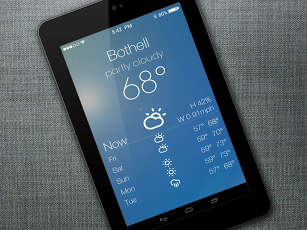
True and complete; THE iOS7 theme for Android. Includes Icons, clock, lockscreen slider, Control center and Notification center look for your homescreens.== LIMITED TIME PROMO OFFER ==Buy any 5 apps from me and get the sixth app of your choice (from my 60 apps of course) for free. Mail me and I'll send you the APK.Android+iOS = AndiOS; pronounced like Adios, but with a 'n' in it.This is a theme pack to make your Android device look like Apple's forthcoming mobile OS iOS7; BEFORE actual iPhone / iPad users can..!! (Ohhh... the irony :P). Show it off and enjoy the bragging rights, all thanks to Android's customization prowess. Change the look of your entire device. Both lockscreen and homescreen. It's not only icons & wallpapers, like other iOS7 themes available in play store.== FEATURES ==Get the iOS7 Notification center look on one of your screens.Get the iOS7 Control center look on another one of your screens; including widget for power control.You can change icons too, to look like those of iOS7.Yes, you get custom made HD wallpapers too for all screens.iOS7 lockscreen clock and unlock slider.A full page weather skin, to match the weather app; i.e. an entire homescreen will show weather.Works fabulously on HD phones & Tablets too. Compare screenshots below with actual iOS7 screenshots shown in Apple website and then tell me if this is not the best reproduction of that.== INSTRUCTIONS == READ BEFORE BUYING ==This is not a stand-alone app. This is not a CM / AOKP theme. You need to have a custom launcher (like Nova or Apex), UCCW etc. What this theme can and can't do, which apps you need to have and extremely detailed step by step instructions of how to apply the theme are available here - http://goo.gl/DyLC1Please read the instructions before you buy. Don't go on leaving negative reviews because you didn't read the instructions and didn't read what this theme can't do.== TIPS / TROUBLESHOOT ==If the "Install" step fails; go to Android settings > Security and make sure "Unknown sources" is enabled. This is required because Jelly bean encryption had broken theme apps download from play store. This is the workaround fix for that. Google "Jellybean encryption issue" to find out more.To change temperature unit between Celsius and Fahrenheit -> Launch UCCW app itself. Tap Menu, tap settings. Here, if "Celsius" is marked, temperature will display in Celsius. If unmarked, Fahrenheit.If weather info is not displayed/updated, Launch UCCW app itself. Tap Menu, tap settings. Tap "Weather provider" and make sure OpenWeatherMap is selected. Tap Location and make sure "Auto location" is selected.Mail me if you have ANY issues.== DISCLAIMER ==This app is of course NOT affiliated with or endorsed by Apple Inc. I made this app myself to imitate the look of iOS7 and I have no association whatsoever with any entity.bagarwa
About iOS7 Theme Pack - AndiOS7
The company that develops iOS7 Theme Pack - AndiOS7 is iWizard. The latest version released by its developer is 1.1.
To install iOS7 Theme Pack - AndiOS7 on your Android device, just click the green Continue To App button above to start the installation process. The app is listed on our website since 2013-07-02 and was downloaded 0 times. We have already checked if the download link is safe, however for your own protection we recommend that you scan the downloaded app with your antivirus. Your antivirus may detect the iOS7 Theme Pack - AndiOS7 as malware as malware if the download link to vic.uccw.andios7 is broken.
How to install iOS7 Theme Pack - AndiOS7 on your Android device:
- Click on the Continue To App button on our website. This will redirect you to Google Play.
- Once the iOS7 Theme Pack - AndiOS7 is shown in the Google Play listing of your Android device, you can start its download and installation. Tap on the Install button located below the search bar and to the right of the app icon.
- A pop-up window with the permissions required by iOS7 Theme Pack - AndiOS7 will be shown. Click on Accept to continue the process.
- iOS7 Theme Pack - AndiOS7 will be downloaded onto your device, displaying a progress. Once the download completes, the installation will start and you'll get a notification after the installation is finished.
Program Details
System requirements
Download information
Pricing
Version History
version 1.1
posted on 2013-07-02
version 1.1
posted on 2013-07-02
Several fixes and updates
Disclaimer
Official Google Play Link
We do not host iOS7 Theme Pack - AndiOS7 on our servers. We did not scan it for viruses, adware, spyware or other type of malware. This app is hosted by Google and passed their terms and conditions to be listed there. We recommend caution when installing it.
The Google Play link for iOS7 Theme Pack - AndiOS7 is provided to you by apps112.com without any warranties, representations or guarantees of any kind, so access it at your own risk.
If you have questions regarding this particular app contact the publisher directly. For questions about the functionalities of apps112.com contact us.
